
What did you get from the time you spent away from your phone? In Planet Builder, the answer is a planet.
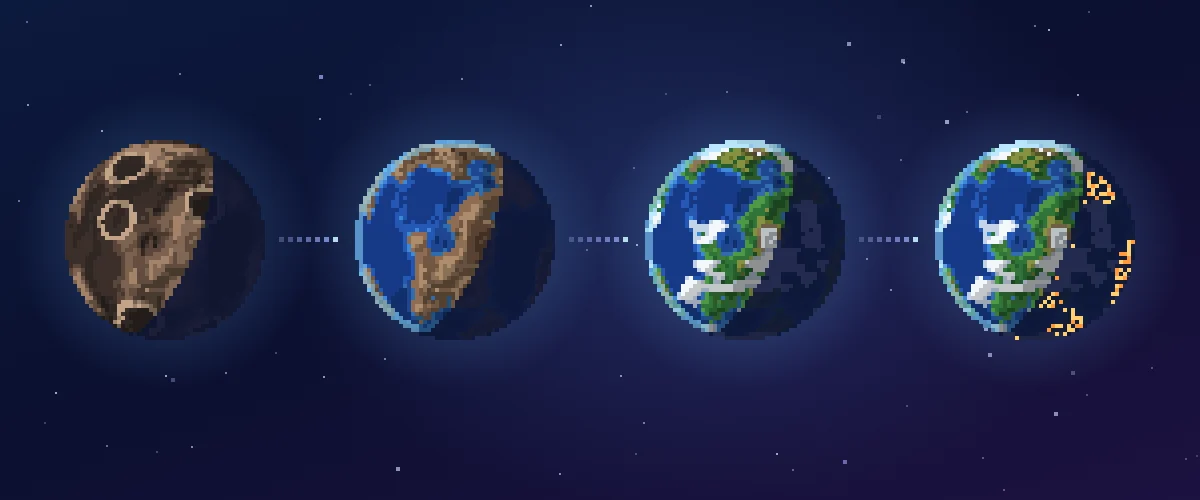
Planet Builder is a focus timer game built into OXO. The longer you focus, the further your planet grows. It starts as bare rock and grows until city lights appear on its night side.
You can play it on iOS and Android, and it is free to play.
Press start, and your planet starts to grow
There are only three steps: focus, collect stardust, and pull a star core.
Choose a planet, press start, and put your phone down. While the timer runs, your planet keeps building, and you collect stardust at the same time.
When the session ends, everything settles. The progress stays on the planet, and the stardust goes into your pocket. You can use stardust to pull new star cores, and each core decides the character of your next planet.

Your planet grows from bare rock to city lights
Take a planet from a life core as an example. It grows oceans, then vegetation, then life. Finally, city lights appear on its night side.
The terrain is generated from the time you focus. Every change on the planet grows there. It is not a swapped picture.
Planet Builder never rushes you, and there is no streak to protect. If you do not focus today, your planet simply waits for you.
Six star cores make every planet different
There are six star cores: life, wasteland, frost, molten, heavy and aberration. A random seed is added too, so no two planets ever look the same.
A fully grown planet can house a companion. Any planet you raise to 100% is recorded forever in the Stellar Archive.
You can also visit a friend’s system. To see more of the game, go to the Planet Builder game page.
Three things every new player should know
Stopping early is never wasted. The time you already focused still counts toward your planet’s progress and your stardust.
You do not have to keep the app open. The timer keeps running in the background. When you come back, your progress and stardust are added for you.
A full system is not a problem. You can recycle planets, or start the whole system over. Your Stellar Archive stays either way.
Up next
Feature spotlight | Live streaming: how to go live and how to watch